I'd used Zwift since the COVID lock-downs but realised I only ever touched one feature: structured workouts. No group rides, no racing, no virtual scenery. Just a trainer, and intervals. For what amounts to "send target watts to trainer, show numbers", a 3D renderer draining the battery and spinning up the fans felt unnecessary.
So I built the lightest possible alternative. Terminal-based, Bluetooth-connected, under 15 seconds from launch to pedalling. No GPU, no account, no virtual world. Just Python, Bleak for BLE, and Textual for the UI.
Talking to Hardware
Indoor trainers communicate over BLE using standardised GATT services: Fitness Machine Service (0x1826) for control, Cycling Power (0x1818), and Heart Rate (0x180D). The interesting bit is parsing the byte arrays - BLE fitness specs use flag-driven variable-length formats where each bit in a flags field determines which data fields follow. Get the offset arithmetic wrong and you're briefly displaying 40,000 watts.
Controlling the trainer means writing opcodes to Fitness Machine Service (FTMS's) Control Point characteristic. The spec says trainers should acknowledge commands. In practice, some just don't. The code waits two seconds for a response and treats silence as success - pragmatism born from testing on real hardware.
Workouts use Zwift's ZWO format (XML), with power targets as fractions of FTP. A WorkoutRunner ticks every second and sends updated targets to the trainer whenever the interval changes.
Threading and the UI
BLE callbacks fire from Bleak's asyncio context. Textual's UI runs its own event loop. You can't touch widgets from a BLE callback. The bridge is call_later() - every BLE notification parses bytes into a TrainerData dataclass, then hands it to the UI thread. From there, Textual's reactive attributes handle the re-render automatically.
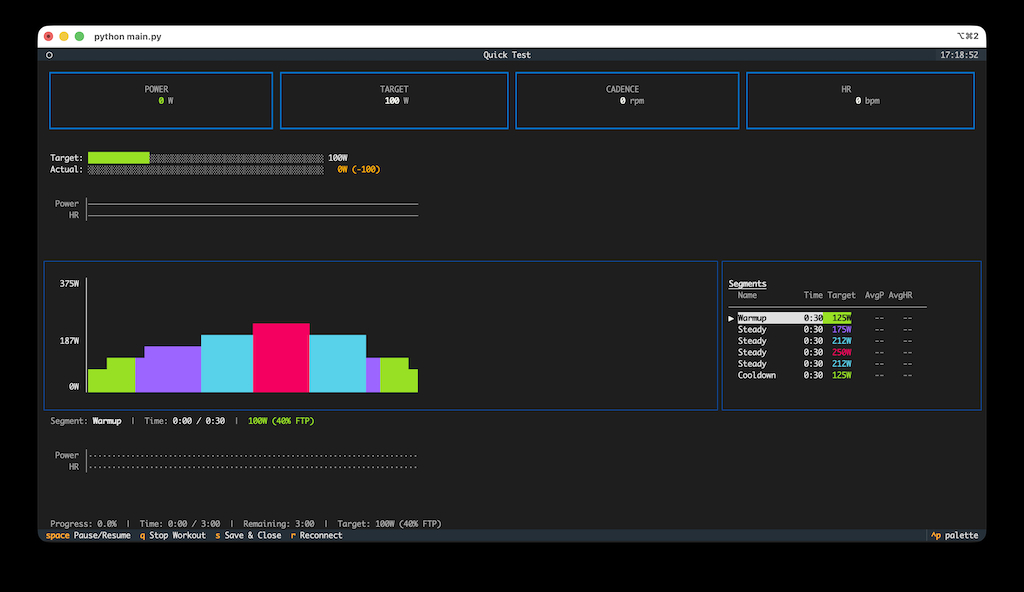
The workout screen shows live power, target, cadence, and heart rate as large-format numbers. A zone-coloured ASCII workout profile scrolls with progress. Each bar is a Unicode block character coloured by training zone - blue for endurance, yellow for sweet spot, red for VO2max. I had to build this from scratch since Textual's built-in sparkline only supports single-colour gradients.
When Things Go Wrong
Bluetooth drops. Your body is between the laptop and the trainer, the motor is electrically noisy. Both connections poll at 10Hz and auto-reconnect with a 5-second backoff. The UI shows -- for stale data rather than frozen values.
For crashes, every data point writes to a JSONL temp file with immediate flush. Clean exit converts to TCX for Strava. Crash mid-ride? Next launch recovers the orphaned file automatically. You never lose more than a second of data.
The Result
~5,600 lines of Python, 144 tests, two dependencies. No database, no web server, no GPU. Launch to pedalling in about 15 seconds cold, under 5 with saved devices. The architecture splits into core/ (BLE, workout logic, recording - fully testable without UI) and textual_ui/ (purely presentational). A BLE replay system lets you develop and test without being on the bike.
Takeaways
BLE specs are flag-driven puzzles - read the Bluetooth SIG docs carefully before writing parsers. Thread safety needs an explicit bridge - a single call_later handoff keeps things clean. Hardware doesn't follow the spec - timeouts and pragmatic defaults beat strict compliance. Design crash recovery on day one - it's trivial to build early, painful to retrofit. And terminal UIs can be genuinely good - the text grid constraint forces you to be deliberate about information hierarchy.